
The Timesheet entry module will enable the users to create the timesheet for the users of the application. These timesheets can be against any Work Order of a company or Property.
Choosing the Timesheet Entry under the Timesheet will list all the timesheet entries already created. Details here will include the Work Order # and the Description against which the Time entries have been created.
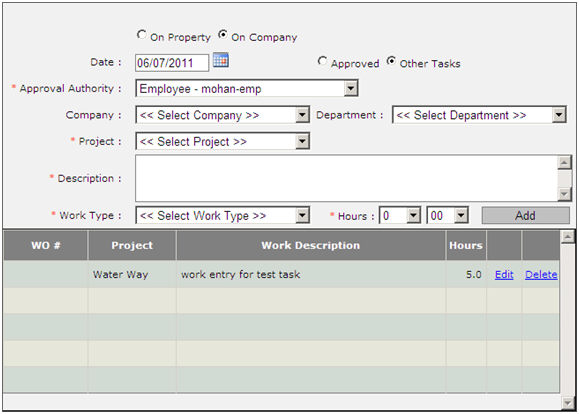
To create a new timesheet entry, enter the description of the task entry, the Work Type under which the time entry is to be logged and the hours worked on the same. Click on the Add button to add this entry to the list of the Timesheet entries.
This list will include details on the following:
WO #
Project
Work Order Description
Hours
Having provided the above details, click on save to save the entry created.